1、找到百词斩数据库
在文件管理:Android/data/com.jiongji.andriod.card/files/baicizhan/lookup.db 长下面这样
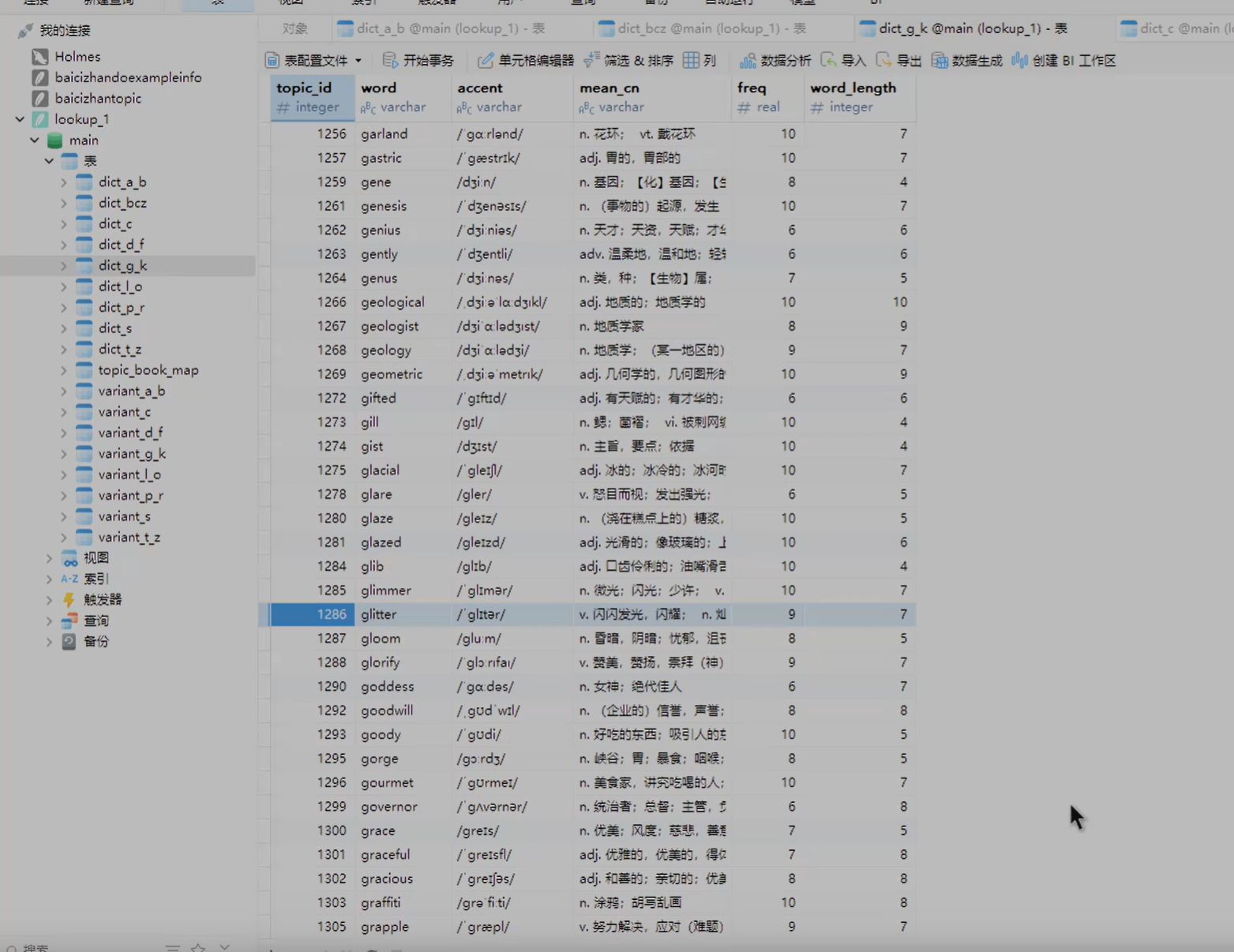
2、找到当前背诵的词书
在文件管理:Android/data/com.jiongji.andriod.card/files/baicizhan/roadmap里面的.baicizhan文件,可以拷贝出来命名为json文件,长下面这样
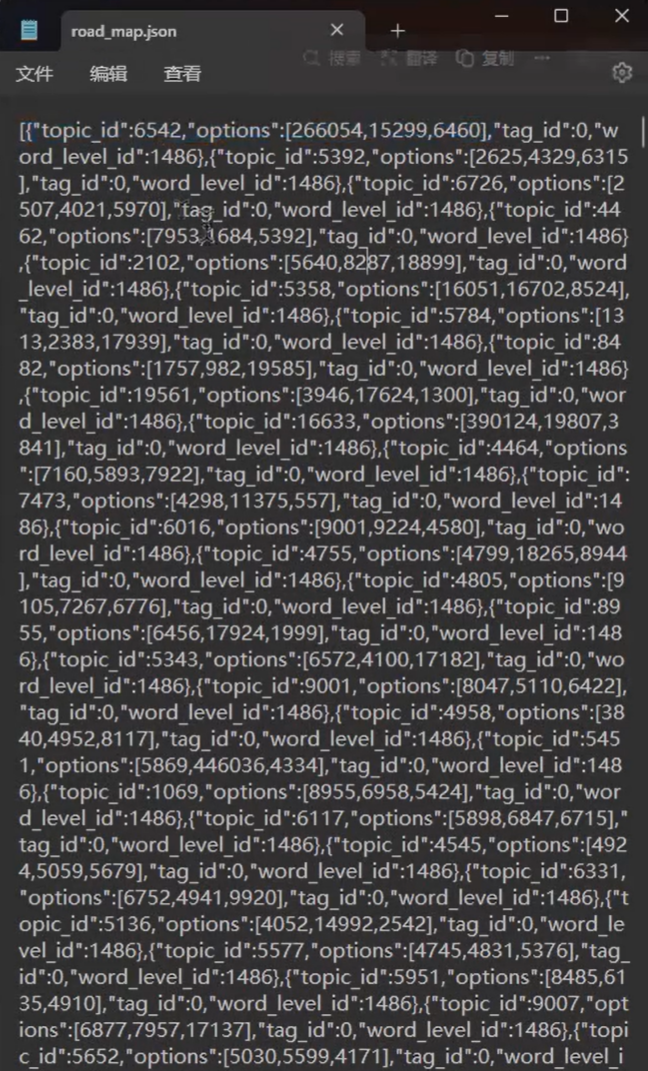
3、放到同一文件夹下
用以下代码匹配索引
# -*- coding: utf-8 -*-
"""
Created on Sat Oct  4 16:42:03 2025

@author: 猴猴猴
"""

import json
import sqlite3
import csv
import math

# --- 文件路径配置 ---
JSON_FILE_PATH = 'liuji.json'
DB_FILE_PATH = 'lookup.db'
OUTPUT_CSV_PATH = 'output.csv'
TXT_OUTPUT_PREFIX = '单词列表'
WORDS_PER_TXT_FILE = 500

def get_dict_tables(cursor):
    """
    从数据库中查询所有以 'dict_' 开头的表名。
    """
    cursor.execute("SELECT name FROM sqlite_master WHERE type='table' AND name LIKE 'dict_%'")
    tables = [row[0] for row in cursor.fetchall()]
    print(f"在数据库中找到 {len(tables)} 个单词表: {tables}")
    return tables

def process_data():
    """
    主处理函数:读取JSON和DB,生成CSV和分块的TXT文件。
    """
    print("开始处理...")

    # 1. 读取 liuji.json 文件
    try:
        with open(JSON_FILE_PATH, 'r', encoding='utf-8') as f:
            json_data = json.load(f)
        print(f"成功读取 {len(json_data)} 条记录从 {JSON_FILE_PATH}")
    except FileNotFoundError:
        print(f"错误: 未找到JSON文件 at '{JSON_FILE_PATH}'")
        return
    except json.JSONDecodeError:
        print(f"错误: {JSON_FILE_PATH} 文件格式不正确,无法解析。")
        return

    # 2. 连接 lookup.db 数据库
    try:
        conn = sqlite3.connect(DB_FILE_PATH)
        cursor = conn.cursor()
        print(f"成功连接到数据库: {DB_FILE_PATH}")
    except sqlite3.Error as e:
        print(f"错误: 无法连接到数据库 at '{DB_FILE_PATH}': {e}")
        return

    # 获取所有相关的单词表
    dict_tables = get_dict_tables(cursor)
    if not dict_tables:
        print("错误: 在数据库中没有找到任何 'dict_' 开头的表。请检查数据库文件。")
        conn.close()
        return

    # 准备存储合并后的数据和所有单词
    combined_data_for_csv = []
    all_words = []

    # 3. 遍历JSON数据,在所有dict表中查询并合并
    print("正在从数据库查询单词信息...")
    for index, item in enumerate(json_data):
        topic_id = item.get('topic_id')
        if not topic_id:
            print(f"警告: 找到一条没有 topic_id 的记录,已跳过: {item}")
            continue

        found_in_db = False
        # 遍历所有单词表去寻找 topic_id
        for table_name in dict_tables:
            # 注意: 表名不能通过 '?' 参数化,但因为我们是从数据库自身获取的表名,所以这里使用f-string是安全的。
            query = f"""
                SELECT word, accent, mean_cn, freq, word_length
                FROM `{table_name}`
                WHERE topic_id = ?
            """
            try:
                cursor.execute(query, (topic_id,))
                db_result = cursor.fetchone()

                if db_result:
                    # 找到了!解包数据
                    word, accent, mean_cn, freq, word_length = db_result

                    # 将 options 列表转换为字符串以便写入CSV
                    options_str = json.dumps(item.get('options', []), ensure_ascii=False)

                    merged_record = {
                        'topic_id': topic_id,
                        'word': word,
                        'accent': accent,
                        'mean_cn': mean_cn,
                        'freq': freq,
                        'word_length': word_length,
                        'source_table': table_name,  # 记录是在哪个表中找到的
                        'options': options_str,
                        'tag_id': item.get('tag_id'),
                        'word_level_id': item.get('word_level_id')
                    }
                    combined_data_for_csv.append(merged_record)
                    all_words.append(word)
                    found_in_db = True
                    break # 找到后就不用再查其他表了,跳出内层循环
            except sqlite3.OperationalError as e:
                print(f"查询表 '{table_name}' 时出错: {e}. 可能该表结构不同,已跳过。")


        if not found_in_db:
            print(f"警告: 在所有单词表中均未找到 topic_id '{topic_id}' 对应的单词。")

    # 关闭数据库连接
    conn.close()
    print("数据库查询完成,连接已关闭。")

    # 4. 生成CSV文件 (代码与之前相同)
    if combined_data_for_csv:
        print(f"正在生成CSV文件: {OUTPUT_CSV_PATH}")
        csv_headers = [
            'topic_id', 'word', 'accent', 'mean_cn', 'freq', 'word_length',
            'source_table', 'options', 'tag_id', 'word_level_id'
        ]
        try:
            with open(OUTPUT_CSV_PATH, 'w', newline='', encoding='utf-8-sig') as f:
                writer = csv.DictWriter(f, fieldnames=csv_headers)
                writer.writeheader()
                writer.writerows(combined_data_for_csv)
            print("CSV文件生成成功!")
        except IOError as e:
            print(f"错误: 写入CSV文件失败: {e}")
    else:
        print("没有可写入CSV的数据。")

    # 5. 生成分块的TXT文件 (代码与之前相同)
    if all_words:
        print("正在生成分块的TXT文件...")
        total_words = len(all_words)
        num_files = math.ceil(total_words / WORDS_PER_TXT_FILE)
        for i in range(num_files):
            start_index = i * WORDS_PER_TXT_FILE
            end_index = start_index + WORDS_PER_TXT_FILE
            word_chunk = all_words[start_index:end_index]
            txt_filename = f"{TXT_OUTPUT_PREFIX}_{i+1}_of_{num_files}.txt"
            try:
                with open(txt_filename, 'w', encoding='utf-8') as f:
                    f.write(",".join(word_chunk))
                print(f"成功生成文件: {txt_filename}")
            except IOError as e:
                 print(f"错误: 写入TXT文件 {txt_filename} 失败: {e}")
    else:
        print("没有可写入TXT文件的数据。")

    print("\n所有处理已完成!")


if __name__ == '__main__':
    process_data()
4、导入到百词斩单词本
csv文件可以自己看,txt文件需要自己复制到百词斩的单词本中手动添加(单次添加500词),添加完就可以导出pdf了